Of course we prefer it if you run your entire infrastructure in the dataforest cloud. With a Seed as a DDoS proxy, however, you can use our DDoS protection for servers that are not hosted with us at all. The Seed takes the public address, our filters handle the attack protection, and a WireGuard tunnel carries only the clean packets to your server, whether it runs at another provider, in a homelab or in your own data center. Your infrastructure stays where it is.
Who the proxy is for
The proxy protects any service that is reachable on fixed TCP or UDP ports. Typical cases:
- Homelab. A game server or voice server at home, often behind carrier-grade NAT without a public address of its own. The tunnel is opened from your server, so it needs neither a port forward nor a fixed address. An attack hits the Seed, not your home internet.
- Server at another provider. The protection there does not understand game protocols or blocks the whole address during attacks. The Seed takes over the public address, your server stays where it is.
- Your own data center or office. Services that have to be reachable from outside get a protected address without your own uplink becoming the target.
For many applications there are filters that know the respective protocol: Minecraft Java, FiveM, DayZ, TeamSpeak 3, WireGuard, OpenVPN, SSH, Remote Desktop and web applications. All other TCP and UDP services can be protected with generic filters. One Seed can protect several servers and services at the same time, more on that at the end.
How the proxy works
A user connects to the Seed's address. Before the packet reaches the Seed, the DDoS protection at our network edge checks whether it matches a protected application. Everything else is dropped. On the Seed, an nftables rule rewrites the destination address, from the Seed's public address to the tunnel address of your server. The sender address stays unchanged. The packet travels through the WireGuard tunnel to your server, which sees the user with their real IP address.
The reply takes the same way back. For that, your server needs a routing rule: everything sent from the tunnel address goes into the tunnel instead of out the regular network card. On the Seed, connection tracking restores the original address.
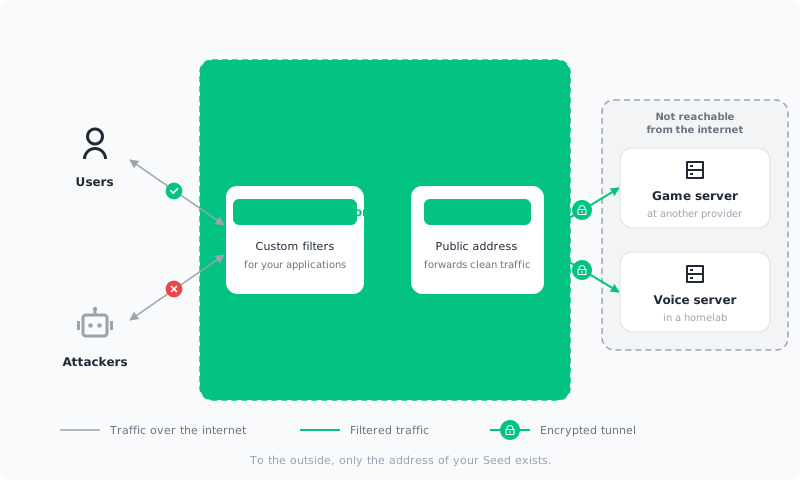
Two things are essential for the protection to hold:
- Nobody may know your server's real address. The proxy only protects the traffic that passes through it. Whoever knows the address behind it can attack it directly.
- Your server only accepts connections from the tunnel. Ideally it has no public address at all. Old DNS records that point directly at it have to go.
Prerequisites
- A Seed with an IPv4 address. How to choose it is covered in the next section.
- A server with root access running your service. It needs no public address, the tunnel is opened from its side.
- SSH access to both machines.
In this guide we protect a Minecraft server in a homelab. It runs on a Linux machine behind a home router, has no public address and listens on port 25565, just as the Minecraft guide sets it up. The Seed has the public address 198.51.100.10. The tunnel uses the network 10.100.0.0/24, the Seed is 10.100.0.1, your server 10.100.0.2.
Create the Seed
Create a Seed with an IPv4 address. Custom filters are booked per IPv4 address, without one there is no proxy.
When choosing the line, CPU and memory play no role, encrypting and forwarding cost hardly any computing power. What matters is the network connection and the traffic allowance, because all of your users' traffic passes the Seed twice, in and out. We therefore recommend a Standard XS for its included traffic and the better data rate. For a single web server an Entry S is enough as well. If it gets tight, you can upgrade the Seed to a bigger model at any time.
Debian 13 is a good choice as the operating system. WireGuard is already part of its kernel, the tools for setting it up have to be installed. Connect to the Seed via SSH:
apt update
apt install -y wireguard-tools nftables
If you see Could not get lock /var/lib/dpkg/lock-frontend, the automatic updates after first boot are still running. Wait a minute and try again.
Configure the DDoS protection
Every Seed is protected by the automatic filters of the DDoS protection from the start. For many applications we additionally have filters that know the respective protocol exactly and drop everything that does not match it. We recommend these custom filters for every server whose address is public. They are booked per IPv4 address and billed by the hour. For our example they exist for both Minecraft Java and WireGuard, so the proxy is fully covered.
In the cloud console, open DDoS Protection, click Configure and set up the Seed's address like this:
- Under Protected resources, add the Seed's IPv4 address.
- Set the type to Custom filters.
- Under Protected applications, use Protect application to create three entries from the catalog: Minecraft Java for port 25565, WireGuard for the tunnel and SSH for your access.
- Set the default policy to Block. This closes every port that belongs to no protected application. Before ordering, check that SSH and WireGuard are on the list, otherwise you lock out yourself and the tunnel.
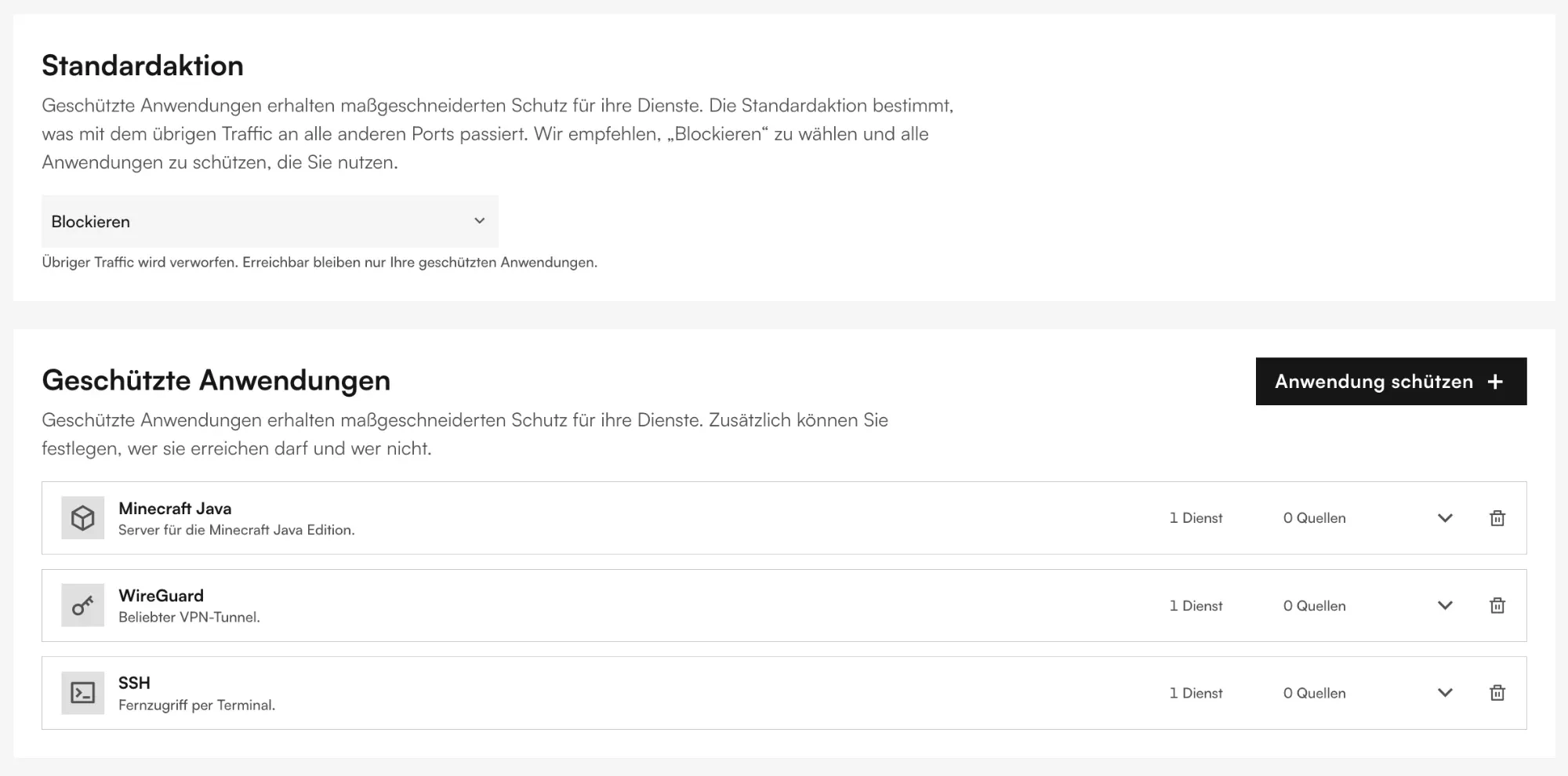
If you run a different service, pick the matching application from the catalog instead of Minecraft Java. For services that are not listed there, there is Other applications, where you specify protocol and port yourself. Every service that should later pass through the proxy needs an entry here. You can adjust the configuration at any time without new costs.
Generate keys
WireGuard needs a key pair on each side, and each side has to know the other one's public key. On the Seed:
umask 077
wg genkey | tee /etc/wireguard/seed.key | wg pubkey > /etc/wireguard/seed.pub
cat /etc/wireguard/seed.pub
Your server needs the same tools, on Debian and Ubuntu:
apt install -y wireguard-tools
umask 077
wg genkey | tee /etc/wireguard/origin.key | wg pubkey > /etc/wireguard/origin.pub
cat /etc/wireguard/origin.pub
Note both public keys. The private keys stay where they are.
WireGuard on the Seed
Create the file /etc/wireguard/wg0.conf on the Seed:
[Interface]
Address = 10.100.0.1/24
ListenPort = 51820
PrivateKey = <contents of /etc/wireguard/seed.key>

[Peer]
PublicKey = <contents of /etc/wireguard/origin.pub on your server>
AllowedIPs = 10.100.0.2/32
The Seed listens on UDP port 51820 and accepts packets from the peer only with the tunnel address 10.100.0.2 as sender. It needs nothing more, because your server's replies always come from this address.
Allow the Seed to forward packets and start the tunnel:
echo 'net.ipv4.ip_forward = 1' > /etc/sysctl.d/99-proxy.conf
sysctl -p /etc/sysctl.d/99-proxy.conf
systemctl enable --now wg-quick@wg0
Route traffic through the Seed
First check the name of the Seed's public network interface, eth0 in the examples:
ip -br link
Then replace the contents of /etc/nftables.conf on the Seed:
#!/usr/sbin/nft -f
flush ruleset

table ip proxy {
  chain prerouting {
    type nat hook prerouting priority dstnat; policy accept;
    iifname "eth0" tcp dport 25565 dnat to 10.100.0.2
  }

  chain forward {
    type filter hook forward priority filter; policy drop;
    tcp flags syn tcp option maxseg size set rt mtu
    ct state established,related accept
    iifname "eth0" oifname "wg0" ip daddr 10.100.0.2 tcp dport 25565 accept
  }
}
What happens here: for every packet arriving on port 25565, the dnat rule rewrites the destination address to your server's tunnel address. The sender stays as is, there is deliberately no masquerade rule, otherwise your server would only see the Seed. The maxseg rule adapts the TCP segment size to the tunnel, without it large packets get stuck and players get kicked while loading the world. The forward chain lets only the rewritten packets and their replies through, the Seed must not forward anything else.
For a different service you have to change port and protocol in the dnat and in the forward rule, for example udp dport 9987 for TeamSpeak 3 or tcp dport 3389 for Remote Desktop. The maxseg rule stays, it only affects TCP.
Activate the ruleset:
systemctl enable --now nftables
nft -f /etc/nftables.conf
nft list ruleset
That completes the Seed. It accepts connections on port 25565 and waits for your server to open the tunnel.
WireGuard on your server
Create the file /etc/wireguard/wg0.conf on your server:
[Interface]
Address = 10.100.0.2/24
PrivateKey = <contents of /etc/wireguard/origin.key>
Table = off
PostUp = ip rule add from 10.100.0.2 table 100 priority 100
PostUp = ip route add default dev wg0 table 100
PostDown = ip rule del from 10.100.0.2 table 100 priority 100
PostDown = ip route flush table 100

[Peer]
PublicKey = <contents of /etc/wireguard/seed.pub on the Seed>
Endpoint = 198.51.100.10:51820
AllowedIPs = 0.0.0.0/0
PersistentKeepalive = 25
The settings in detail:
AllowedIPs = 0.0.0.0/0allows packets from any sender address through the tunnel. This is required because players arrive with their real addresses.Table = offprevents WireGuard from sending all of your server's traffic through the tunnel because of that. Without this line your server would be unreachable after start.- The
PostUplines create the routing rule: packets with sender10.100.0.2go into the tunnel. Those are exactly the replies to the players. Everything else, such as package updates, keeps taking the regular route. PersistentKeepalive = 25keeps the tunnel open behind the home router as well.
Start the tunnel and check that the Seed is reachable:
systemctl enable --now wg-quick@wg0
ping -c 3 10.100.0.1
The ping travels through the tunnel, from the outside the DDoS protection only sees WireGuard traffic. You do not need a protected application Ping for this. If the Seed does not answer, wg show on both sides tells you whether a handshake took place. If it is missing, the keys usually do not match, or WireGuard is not yet protected in the DDoS protection.
Test the connection
Open Minecraft and connect to the Seed's address, 198.51.100.10 in the example. On your server, the Minecraft log shows the player with their real address:
[Server thread/INFO]: Steve[/203.0.113.7:51234] logged in with entity id 118
If it says 10.100.0.1 instead, the forwarding still runs with masquerade, or the routing rule on your server is missing. Check ip rule and ip route show table 100.
On the Seed you can see the forwarded connections with:
conntrack -L -p tcp --dport 25565
If conntrack is missing: apt install conntrack.
Lock down the server and switch the address
From now on, only the Seed's address exists to the outside. It is the address for your users, and your server should only be reachable through the Seed. Best of all, it is not reachable from the internet at all: in a homelab you then need no port forward on the router, at a cloud provider no public IP address. If you set up a port forward for the Minecraft server earlier, remove it now.
If your server has a public address anyway, set up a firewall that only accepts connections on port 25565 from the tunnel, and do not hand out the address anywhere. A firewall does not protect against DDoS attacks, it only prevents someone from reaching your server directly, bypassing the proxy. With ufw that is two rules:
ufw allow in on wg0 to any port 25565 proto tcp
ufw deny 25565/tcp
If ufw is not active on the server yet, allow SSH first and then enable it, otherwise you lock yourself out:
ufw allow OpenSSH
ufw enable
With nftables instead of ufw, the same can be achieved like this:
nft add table inet origin
nft add chain inet origin input '{ type filter hook input priority filter; policy accept; }'
nft add rule inet origin input iifname "wg0" tcp dport 25565 accept
nft add rule inet origin input tcp dport 25565 drop
The Minecraft example applies here as well: port and protocol belong to your application. For a UDP service the ufw rules read proto udp and 9987/udp accordingly.
Then point your domain's DNS record at the Seed's address and delete all records that still point directly at your connection or server. If the address has been publicly known for a while, for example in server lists, in the end only a new address helps. Attackers keep addresses.
Protect several servers and services
One Seed can protect any number of servers. Every additional server gets its own key pair, its own tunnel address and its own [Peer] block in the Seed's wg0.conf:
[Peer]
PublicKey = <public key of the second server>
AllowedIPs = 10.100.0.3/32
On the second server, wg0.conf looks like above, only with Address = 10.100.0.3/24 and 10.100.0.3 in the PostUp and PostDown lines. Every additional service, no matter on which server, then needs three things: a dnat rule and a forward rule on the Seed, plus an entry among the protected applications. For a TeamSpeak server on port 9987/UDP on the second server, for example:
iifname "eth0" udp dport 9987 dnat to 10.100.0.3
iifname "eth0" oifname "wg0" ip daddr 10.100.0.3 udp dport 9987 accept
One port, one address. A public address can assign each port only once. If you want to protect two Minecraft servers, you have two options:
- The second server deviates from the default port, for example to 25566. In the DDoS protection you add this port to the Minecraft Java application as another service, and on the Seed the
dnatrule for port 25566 points at the second server. Players then have to enter the address as198.51.100.10:25566. - If the port cannot be changed, you can book an additional IPv4 address for the Seed. The DDoS protection can be copied to the new address in the configurator by adding it under Protected resources. On the Seed, the rules then have to distinguish by destination address, for example
ip daddr 198.51.100.11 tcp dport 25565 dnat to 10.100.0.3.
UDP services. The application must send its replies from the tunnel address for the routing rule to apply. TCP services do this automatically, UDP services only when they are bound to that address. For TeamSpeak this is the setting voice_ip=10.100.0.3, for Source engine games the launch parameter -ip 10.100.0.3. If an application offers no such setting, forwarding with masquerade on the Seed remains. It always works, but then the service only sees the Seed's address instead of the players'.
Servers without IPv4
Only the Seed needs the IPv4 address, because the DDoS protection is booked per IPv4 address. The servers behind it need none. This applies to a homelab behind DS-Lite or carrier-grade NAT just as to a server at another provider that only has an IPv6 address.
Only the far end of the tunnel has to change for that: enter the Seed's IPv6 address as the Endpoint in your server's wg0.conf, for example [2001:db8::1]:51820. Every Seed has an IPv6 address. WireGuard then carries the inner tunnel network 10.100.0.0/24 over IPv6, nothing else in the guide changes. If you share an IPv4 address with others via DS-Lite or carrier-grade NAT, the Seed's IPv4 address works as the endpoint as well, since the tunnel is opened from your server.
For your users nothing changes: players get the Seed's IPv4 address, connect via IPv4, and their IPv4 addresses appear unchanged in your server's logs. A Minecraft server without an IPv4 address of its own is thus publicly reachable and protected, which would not be possible at all without the proxy.
Troubleshooting
No handshake in wg show:
Compare the public keys of both sides. Also check whether WireGuard is protected as an application in the DDoS protection. With the default policy set to Block, the tunnel does not get through otherwise.
Ping through the tunnel works, players do not arrive:
Check nft list ruleset on the Seed. The most common cause is a wrong interface name in the rules or a forgotten net.ipv4.ip_forward.
Players connect but get kicked while loading the world:
The maxseg rule is missing or comes after the accept rule. It has to come before so it is applied to new connections.
Your server shows 10.100.0.1 instead of the player's address:
A masquerade rule is active on the Seed, or the routing rule from the PostUp lines is missing on your server.
Your server is unreachable after starting the tunnel:Table = off is missing in wg0.conf. Because of AllowedIPs = 0.0.0.0/0, WireGuard then routed all traffic into the tunnel. Run wg-quick down wg0 locally or via your provider's console and add the line.
Summary
Your Minecraft server is now reachable only through the Seed. The DDoS protection filters the traffic before it reaches the Seed, the tunnel carries the clean packets to your home, and your players arrive with their real address. If you move the server later, you only have to adjust the tunnel. For your players the address stays the same.
Which applications are suited for the proxy and how it compares to other options is described on the DDoS protection solution page. If your game server runs directly on a Seed, you do not need a proxy: the Minecraft guide shows how to protect the application there directly.
